
Delete contacts from other systems as well
When deleting contacts from Custobar, it is essential to delete them from your other systems or ensure the passive contacts won’t be returned to Custobar. Deleting the contacts only from Custobar usually isn’t enough because the different systems might bring the old customer data back. Here’s what we suggest to do when deleting old contacts:
- Begin in Custobar by checking which contacts you want to delete. Using the “last active date” is useful, as you can create audiences of customers who have been passive for a certain amount of time. Our advice is to delete contacts older than six years, but of course, you should decide and determine what’s best for you.
- Delete the customers from your other systems that bring data to Custobar
Delete contacts in Custobar
Remove customer information from Custobar by following the steps below. There’s also a way to delete customers in bulk (not suitable for GDPR removals) and delete customers if your customer data is coming in from Shopify.
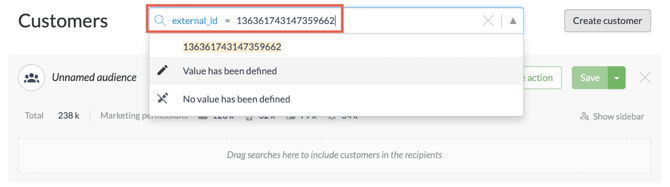
First, search for the right customer with their customer number, email or other identifying information.
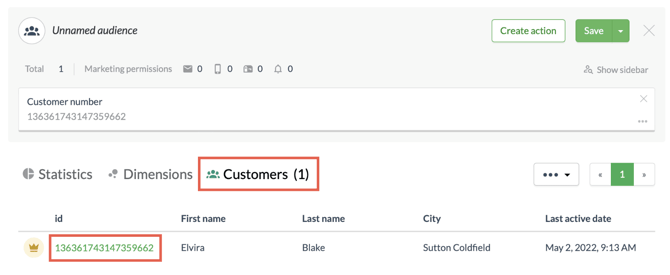
After that, navigate to the Customer 360° view by clicking on the customer list under the search block.
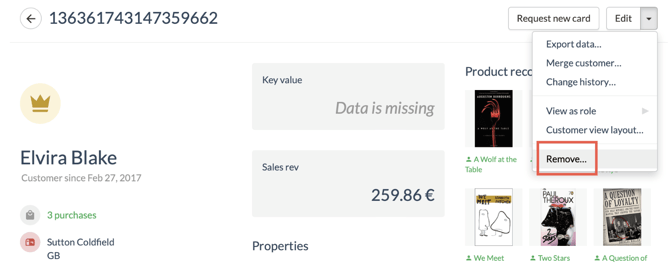
In the 360° view, click on “Edit” in the right-hand corner and choose “Remove” in the drop-down menu.
Next, you can choose if you want to “Delete customer and anonymise statistics (GDPR removal requests)” or “Delete customer and related sales, events and statistics, and release customer ID”.
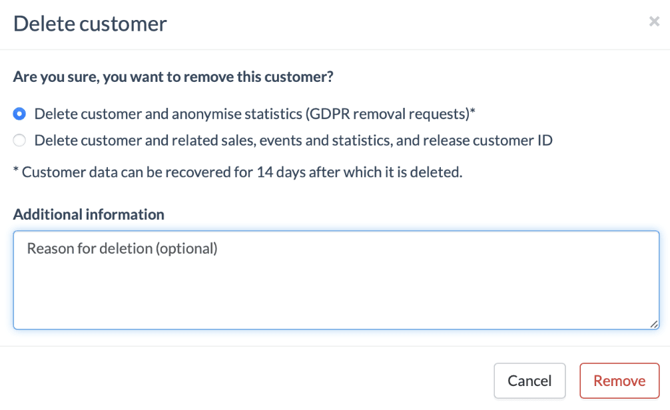
Option 1: Delete customer and anonymise statistics (GDPR removal requests)
This option is designed for right to erasure requests. It uses the customer is_forgotten process to scrub personal data while preserving business intelligence.
-
How it works: All Personally Identifiable Information (PII)—including names, email addresses, phone numbers, and physical addresses—is permanently erased from the customer profile and any associated sales or event records.
-
Data retention: While the identity is removed, the non-identifiable activity (purchase history, campaign statistics, and revenue) remains intact. This ensures your overall reporting and financial figures stay accurate.
-
The grace period: There is a 14-day recovery window. During this time, the process can be reversed. After 14 days, the anonymisation becomes permanent and irreversible.
-
Customer ID status: The specific Customer ID is retired and cannot be reused. Even if the same person interacts with your brand again, they cannot be "recreated" under that old ID.
Option 2: Delete customer and related sales, events and statistics, and release customer ID
-
How it works: This removes the customer profile entirely, along with all related sales, events, and statistics generated by that record.
-
Impact on reporting: Because the sales and events are deleted rather than anonymised, this will affect your total statistics and revenue reports.
-
Customer ID status: The customer ID is released. This means the ID can be reused immediately.
-
Recreation: If you import data containing this Customer ID again in the future, a brand-new customer profile will be created.