
Jump to DE version
1. Save your work frequently
Click the Save button often while you are designing. Because the auto-save feature is still in development, manual saving is the most reliable way to protect your progress until the update is live.
2. Report error details to support
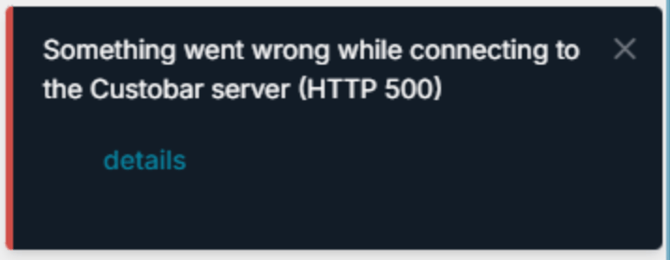
Copy the technical information if a save attempt fails and an error screen appears. You should click the "details" link on the error message, copy the text, and email it to support@custobar.com. This data allows our developers to investigate and resolve the issue quickly.
3. Use the undo button to retry
Press the "undo" button after a failed save attempt. Once you have undone the last action, try saving again. If it continues to fail, repeat the process of pressing "undo" and "save" as many times as necessary until the editor allows the save to complete.
Final thoughts
Taking a moment to save frequently and reporting errors helps us build a more stable editor for you. By using the undo function during glitches, you can maintain your momentum and ensure no creative effort goes to waste.
So stellst du sicher, dass deine Designs in der Email-Editor-Beta immer gespeichert werden
Wir wissen, dass das Speichern in der Beta-Umgebung gelegentlich fehlschlagen kann. Du kannst jedoch verhindern, dass deine harte Arbeit verloren geht, indem du eine proaktive Speicherstrategie nutzt und Fehler an unser Team meldest. Dieser Ansatz stellt sicher, dass dein Arbeitsablauf ununterbrochen bleibt, während wir den Start unserer kommenden Auto-Save-Funktion vorbereiten.
1. Speichere deine Arbeit regelmäßig
Klicke beim Gestalten häufig auf die Schaltfläche „Speichern“. Da sich die Auto-Save-Funktion noch in der Entwicklung befindet, ist das manuelle Speichern der zuverlässigste Weg, deinen Fortschritt zu schützen, bis das Update live ist.
2. Melde Fehlerdetails an den Support
Kopiere die technischen Informationen, wenn ein Speicherversuch fehlschlägt und ein Fehlerbildschirm erscheint. Du solltest auf den Link „details“ in der Fehlermeldung klicken, den Text kopieren und per E-Mail an support@custobar.com senden. Diese Daten ermöglichen es unseren Entwicklern, das Problem schnell zu untersuchen und zu beheben.
3. Nutze die Rückgängig-Schaltfläche zum erneuten Versuchen
Drücke nach einem fehlgeschlagenen Speicherversuch die Schaltfläche „Rückgängig“. Sobald du die letzte Aktion rückgängig gemacht hast, versuche erneut zu speichern. Wenn es weiterhin fehlschlägt, wiederhole den Vorgang des Drückens von „Rückgängig“ und „Speichern“ so oft wie nötig, bis der Editor das Speichern abschließen lässt.
Abschließende Gedanken
Sich einen Moment Zeit zu nehmen, um regelmäßig zu speichern und Fehler zu melden, hilft uns, einen stabileren Editor für dich zu bauen. Indem du bei Störungen die Rückgängig-Funktion nutzt, kannst du deinen Arbeitsfluss aufrechterhalten und sicherstellen, dass keine kreative Arbeit umsonst war.