
1. Collect tracking consent from your customers
Before adjusting any technical settings, determine whether you want to track email opens and clicks in your campaigns at all. Depending on your marketing goals, internal governance, and regional privacy laws, you may decide to track all recipients, track only subscribers who have explicitly opted in, or turn off tracking completely.
You can gather tracking consent for email opens and clicks the same way you collect marketing permissions, but consult your privacy team for more detailed instructions.
2. Update the tracking consent into your customer data
Pass each subscriber's consent status into the can_track_email field in Custobar's customer data. Set this field to true when a customer has consented to tracking, and false when they have not. Keeping this data updated ensures Custobar always knows which contacts may be tracked.
3. Adjust the tracking settings for each campaign
In the new email editor, you can adjust the tracking settings per each campaign. In the email activation view, scroll all the way down to the "Tracking" section and see "Track opens and clicks".
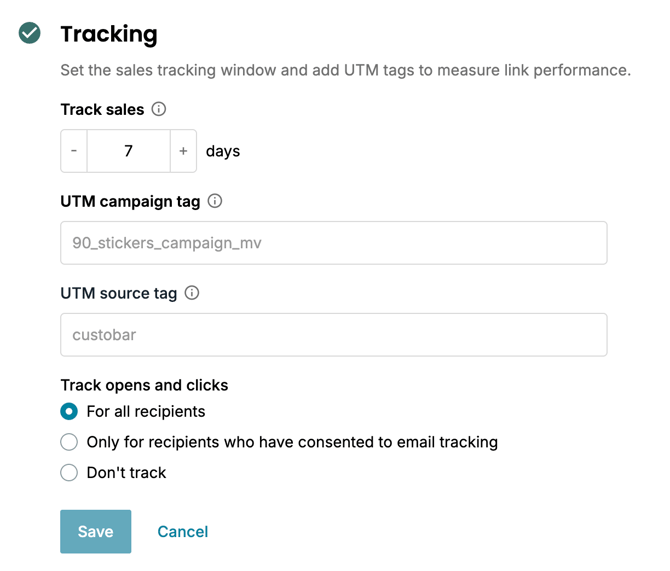
In the old email editor, this feature is not yet available, but it's coming soon. If you wish to turn email tracking off for your campaigns now, please contact support@custobar.com and we can do that for you.
4. Select your preferred tracking option
Choose the radio button under "Track opens and clicks" that matches the decision you made in the first step:
- "For all recipients": Enables open and click tracking for every recipient.
- "Only for recipients who have consented to email tracking": Restricts open and click tracking to subscribers who have consented, which Custobar checks via the
can_track_emailfield. - "Don't track": Disables open and click tracking altogether.
5. Save your configuration
Click the Save button to apply your chosen tracking preferences. If you decide not to make any changes, click Cancel instead.